Note
Hello, welcome to the SunFounder Raspberry Pi & Arduino & ESP32 Enthusiasts Community on Facebook! Dive deeper into Raspberry Pi, Arduino, and ESP32 with fellow enthusiasts.
Why Join?
Expert Support: Solve post-sale issues and technical challenges with help from our community and team.
Learn & Share: Exchange tips and tutorials to enhance your skills.
Exclusive Previews: Get early access to new product announcements and sneak peeks.
Special Discounts: Enjoy exclusive discounts on our newest products.
Festive Promotions and Giveaways: Take part in giveaways and holiday promotions.
👉 Ready to explore and create with us? Click [here] and join today!
OTG HDMI Adapter
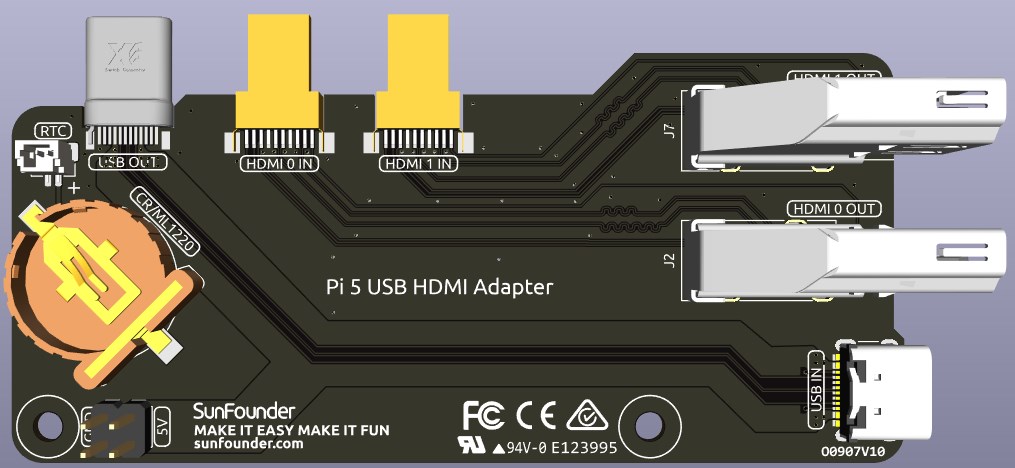
This USB HDMI adapter board is specifically designed for the Raspberry Pi 5. Its primary function is to reposition the USB and HDMI connections to align with the USB interface side of the Raspberry Pi, enhancing accessibility and cable management.
Additionally, the HDMI port is converted to a standard HDMI Type A interface, offering broader compatibility.
OTG
The OTG interface utilizes the USB Type-C port on the Raspberry Pi to enable OTG (On-The-Go) functionality. This feature adds an additional front-facing USB 2.0 port, making it convenient to quickly connect and use simple USB devices.
By default, OTG functionality is not enabled in the system. However, it is automatically activated after installing the Pironman 5 software. If needed, you can manually enable it by modifying the /boot/firmware/config.txt file:
dtoverlay=dwc2,dr_mode=host
This line configures the USB controller to operate in host mode, which is required for OTG functionality. Be sure to reboot the system after making changes to the configuration file for them to take effect.
1220RTC Battery Holder
A 1220RTC battery holder is incorporated for convenient installation of an RTC battery. It connects to the Raspberry Pi’s RTC interface via an SH1.0 2P reverse cable.
The battery holder is compatible with both CR1220 and ML1220 batteries. If using an ML1220 (Lithium Manganese Dioxide battery), charging can be configured directly on the Raspberry Pi. Note that the CR1220 is not rechargeable.
Enabling Trickle Charging
Warning
If you’re using a CR1220 battery, do not enable trickle charging as it can cause irreparable damage to the battery and risk damaging the board.
By default, the trickle charging feature for the battery is disabled. The sysfs files indicate the current trickle charging voltage and limits:
pi@raspberrypi:~ $ cat /sys/devices/platform/soc/soc:rpi_rtc/rtc/rtc0/charging_voltage
0
pi@raspberrypi:~ $ cat /sys/devices/platform/soc/soc:rpi_rtc/rtc/rtc0/charging_voltage_max
4400000
pi@raspberrypi:~ $ cat /sys/devices/platform/soc/soc:rpi_rtc/rtc/rtc0/charging_voltage_min
1300000
To enable trickle charging, add rtc_bbat_vchg to /boot/firmware/config.txt:
Open the
/boot/firmware/config.txt.sudo nano /boot/firmware/config.txtAdd
rtc_bbat_vchgto/boot/firmware/config.txt.dtparam=rtc_bbat_vchg=3000000
After rebooting, the system will display:
pi@raspberrypi:~ $ cat /sys/devices/platform/soc/soc:rpi_rtc/rtc/rtc0/charging_voltage
3000000
pi@raspberrypi:~ $ cat /sys/devices/platform/soc/soc:rpi_rtc/rtc/rtc0/charging_voltage_max
4400000
pi@raspberrypi:~ $ cat /sys/devices/platform/soc/soc:rpi_rtc/rtc/rtc0/charging_voltage_min
1300000
This confirms the battery is now under trickle charging. To disable this feature, simply remove the dtparam line from config.txt.